
Word · Excel · PowerPoint
Compare two Word documents and see every change.
PDF Diff puts two versions of a Word document side by side and highlights what was added, changed, and removed. It works with Excel and PowerPoint files too, converts them on your computer, and doesn’t need Microsoft Office.
- Word
- Excel
- PowerPoint


For Windows, macOS, and Linux · All downloads
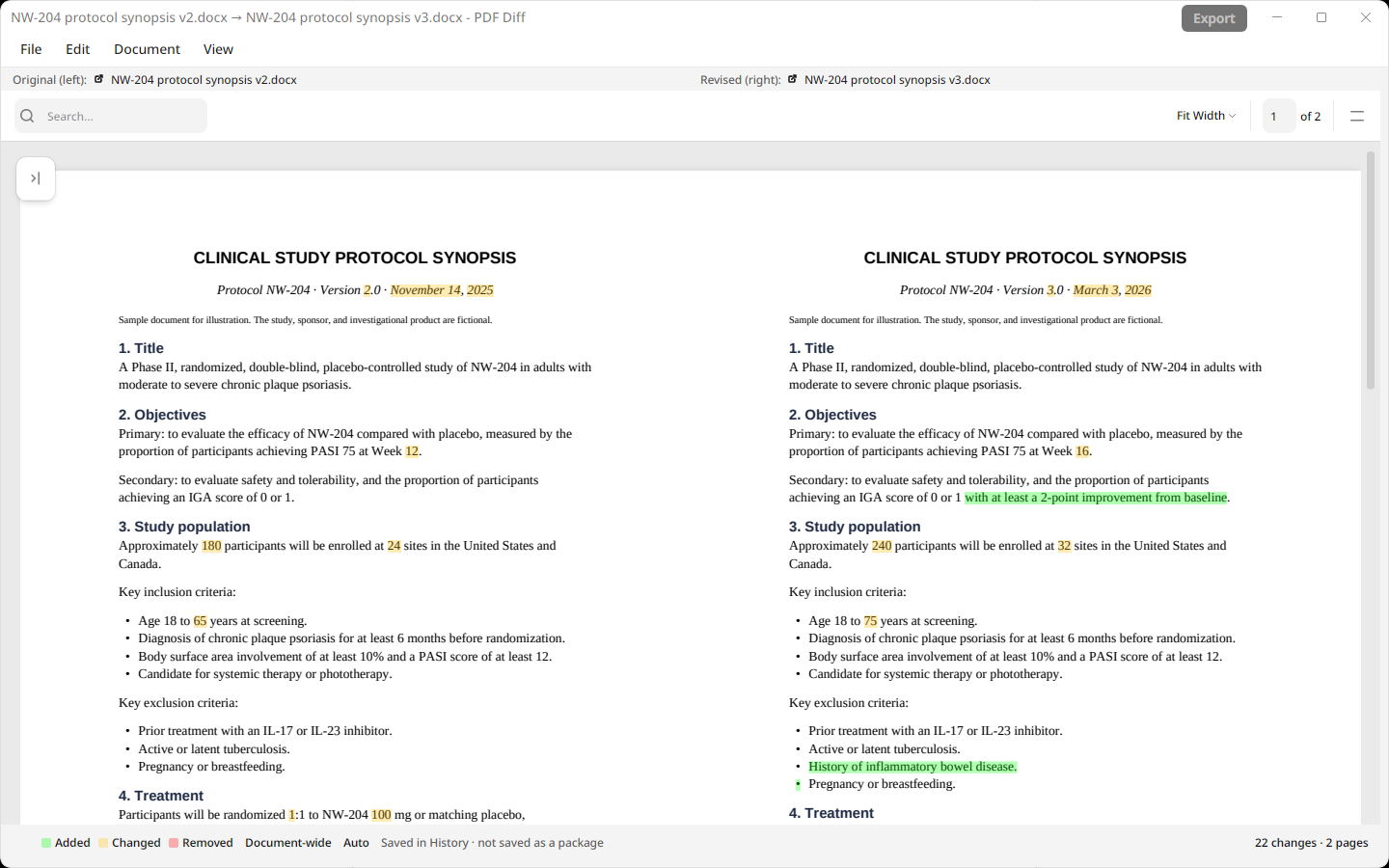
How to compare two Word documents.
Add both .docx files
In PDF Diff, choose New. Drop the original on the left and the revised version on the right, or browse for them.
Check the preview
Each side is converted to PDF on your computer and previewed, marked “Converted from Word”, with any substituted fonts listed.
Press Start and review
Added text is green, changed text amber, removed text red. Export a highlighted PDF to share, or save a .diffx file that keeps both Word files.
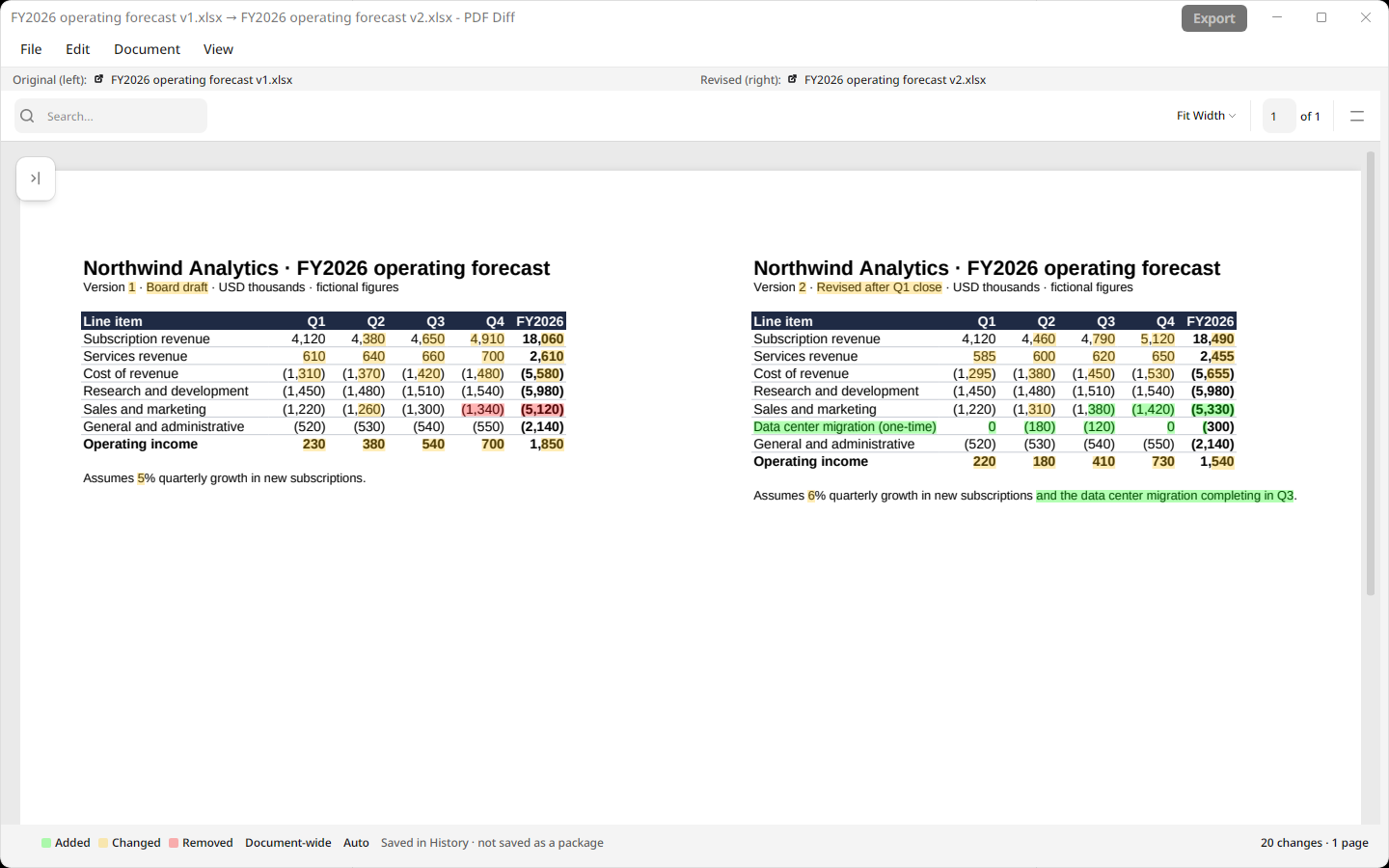
Excel workbooks.
Compare two versions of a forecast, price list, or schedule saved as .xlsx. Workbooks are converted to pages like a printout, and every changed number or label is highlighted.
PDF Diff compares the values shown in the cells. It doesn’t compare formulas or formatting.
PowerPoint presentations.
Compare two .pptx decks to find edited wording, changed figures, and new slides before a presentation goes out. Slides are converted to pages and the text on them is compared.
Mixed formats.
Each side can be a different type. Check the Word draft against the PDF that was signed, or a PDF report against the deck built from it.
How this differs from Word’s Compare.
Microsoft Word’s built-in Compare produces a new document with tracked changes, and it needs Word. PDF Diff shows the two versions side by side with highlights, works without Office on Windows, macOS, and Linux, and handles PDFs, Excel, and PowerPoint files the same way.
Questions
Do I need Microsoft Word or Office installed?
No. PDF Diff converts .docx, .xlsx, and .pptx files itself, on your computer. It works the same on Windows, macOS, and Linux.
Are my Word documents uploaded?
No. Conversion and comparison both run on your computer, and your files aren’t sent to Palm Hill or any other service.
Can I compare a Word document with a PDF?
Yes. Each side can be a PDF, Word, Excel, or PowerPoint file. A common use is checking a Word draft against the PDF that was signed or published.
Can I compare .doc files?
Not directly. Open older .doc, .xls, or .ppt files in Office and save them as .docx, .xlsx, or .pptx, then compare those. Remove any password the same way.
Why does the converted page look slightly different from Word?
PDF Diff uses the fonts installed on your computer. If a document uses a font you don’t have, a similar font is substituted and the selection panel lists it. The text is still compared, but line breaks and page breaks can differ from Word.
Can I compare Excel spreadsheets?
Yes. Workbooks are converted to pages like a printout, and the values shown in the cells are compared. Formulas and formatting aren’t compared.
Is it free?
Yes. PDF Diff is free, with no account and no subscription. Download it for Windows, macOS, or Linux, or get it from the Mac App Store or Microsoft Store.
More: Office files on the home page, Support, and use cases.
Compare your next draft.
Free to download. Your documents stay on your computer.
For Windows, macOS, and Linux · All downloads